
Khelo24Bet APK Download (Android & iOS)
To ensure the safety of your device and account, you should always download the official Khelo24Bet app directly from the operator’s dedicated download page. This page provides the authentic Android APK and iOS app builds. Avoid third-party APK sites or random search results, as fake or “modded” versions often contain malware designed to compromise your data.
Table of Contents
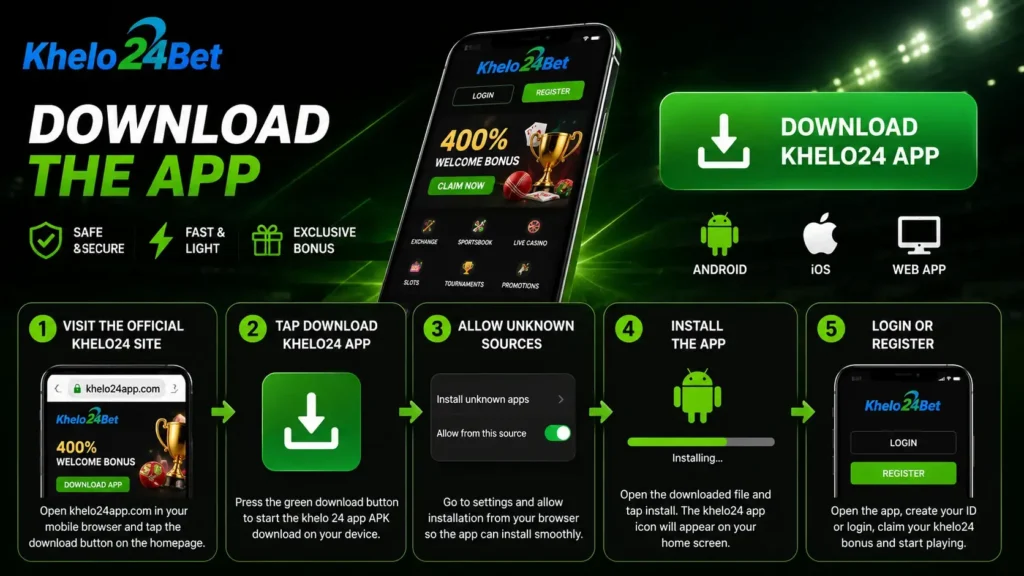
How to Download the Khelo24Bet APK on Android
Khelo24Bet distributes its official Android application directly from its website, rather than through the Google Play Store. The APK file is lightweight (around 4 MB) and requires roughly 40 MB of space after installation, providing full access to casino games, sports betting, and deposits.
Follow these steps to install the app safely:
- Open the official download page: Open Chrome on your Android device and navigate to your main Khelo24Bet URL, then go to the “Mobile Application” or “Download App” section. Avoid clicking on third-party search-result links.
- Download the APK: Tap the “Download for Android” button or scan the official QR code. Confirm the download prompt in your browser.
- Allow installs from unknown sources: Because the app is not on Google Play, Android will block the installation by default. Go to Settings > Security / Apps > Install unknown apps, select your browser (e.g., Chrome), and toggle the permission on to trust the official site.
- Install the APK: Once downloaded, pull down your notification shade or open your Downloads folder, tap the
Khelo24Bet.apkfile, and confirm the installation. - Open and log in: Tap the newly installed Khelo24Bet icon on your home screen to log in or register. Do not create multiple accounts across the app and desktop, as this violates platform terms.
How to Get Khelo24Bet on iOS
The iOS installation process depends on the specific domain version you are using (App Store listing, enterprise profile, or PWA). However, the safest starting point is always the official website, rather than searching the App Store directly.
- Visit the official website: Open Safari on your iPhone and go to the official Khelo24Bet domain.
- Navigate to the download section: Tap the “Download for iOS” link or the iOS logo located in the mobile app section.
- Follow the prompts: You will either be redirected to the App Store or asked to scan a QR code. Confirm that the publisher and branding accurately match Khelo24Bet.
- Install and open: Tap “Get” or “Install” in the App Store (or follow the trusted profile prompts). Once installed, open the app from your home screen.
- Log in or register: Use your existing credentials to log in and play.
How to Spot a Fake or Modded Khelo24Bet APK
Third-party sites frequently offer fake or “modded” APKs claiming to provide “unlimited credits,” “no loss,” or “unlocked VIP.” These are highly dangerous and can lead to stolen funds. Follow these safety rules:
- Download only from the official domain: If the link did not come from your official
downloadpage, treat it as unsafe. - Check the file size: The official APK is roughly 4 MB. Files that are drastically larger or smaller are major red flags.
- Avoid “Mod APKs”: Licensed operators do not publish builds offering unlocked funds or guaranteed wins. These are scams.
- Verify the license and branding: Official Khelo24Bet materials highlight a Curacao license (#365/JAZ). Mismatched logos, incorrect company names, or missing license references indicate a fake app.
Updating to the Latest Version
Store-installed apps and direct APK downloads handle updates differently. Keep a stable internet connection and follow these rules:
- On Android: The app will usually ping you with an update prompt upon launch. Accept prompts that appear inside the official app. If an in-app update fails, do not search for updates on third-party sites; return to the official
downloadpage to get the latest APK manually. - On iOS: Updates are generally handled automatically by the App Store. Ensure your device is set to auto-update, or apply updates manually when the store notifies you.
FAQs: Khelo24Bet APK Download
Is the Khelo24Bet APK safe to install?
Yes, but only if you download it directly from the official Khelo24Bet website or your dedicated download page. Never install APK files from third-party repositories. Enabling “Unknown sources” on Android is safe as long as the file originates from the official domain.
Why can’t I find Khelo24Bet on the Google Play Store?
Google Play restricts real-money gambling apps in many regions, including India. To bypass this, Khelo24Bet distributes its Android app securely via a direct APK download on its website.
How do I update Khelo24Bet to the latest version?
On Android, the app will typically prompt you to download the update upon launch. If that fails, re-download the APK from the official site. On iOS, updates are processed normally through the App Store.
Is there a Khelo24Bet app for iPhone?
Yes. Khelo24Bet provides an iOS app or client. Always initiate the download from the official Khelo24Bet website rather than searching the App Store directly to avoid look-alike scam apps.

Rahul Pujara is an experienced blogger and content researcher with a strong interest in online gaming and digital platforms.
He specializes in researching complex topics and turning them into clear, practical, and easy-to-understand articles.
His areas of focus include gaming guides, platform information, casino games, responsible gaming, and digital trends.
Rahul is committed to creating well-researched, useful, and reader-focused content based on reliable information.